Self-Serve Setup Across a Fragmented Ecosystem

At a Glance

Role: Senior UX Designer — project lead for onboarding and integrations


Users: System administrators and IT managers deploying public safety tools across multi-vendor ecosystems


Problem: Account setup required multiple approvals, handoffs, and days of waiting — with inconsistent steps and terminology across every product


Solution: Self-serve registration, a centralized Connection Center, standardized UX copy, and operational controls that gave administrators confidence from first login through live deployment


Tools: Figma, FigJam, company design system, Google Workspace


Outcome: Onboarding collapsed from days to minutes. Administrators who previously needed multiple support calls completed setup independently. A dual listbox component was adopted into the platform-wide design system.

The Problem

Public safety tech stacks are sprawling — radios, cameras, sensors, and access control systems acquired from different vendors, expected to work as one platform. Getting there required a setup process that was everything it shouldn't be.


The before state was a Google Form. Request-and-wait, with a 3–5 business day activation window and multiple communication threads before an account was live. Every product had its own instructions, its own terminology, its own rhythm. Non-technical administrators were expected to reconcile conflicts across them on their own — and every day they spent waiting was a day the technology investment sat idle.

Key Decisions

Discovery included journey mapping, service blueprinting, VOC interviews, and QA teardowns with engineering. The value wasn't the artifacts — it was the strategic decisions they produced.


Define a minimum viable setup baseline per product. Rather than solving every edge case across every product simultaneously, I pushed for the smallest set of steps that consistently got a team operational. This gave us a shippable target without waiting on completeness, and a foundation that advanced scenarios could layer onto later.


Standardize the sequence, not the features. Each product had different capabilities, but the rhythm of setup could be the same. I established a universal pattern — check prerequisites → connect → verify → monitor — so administrators who learned the pattern once could apply it everywhere.


Self-serve first, guided second, human-assisted last. Service blueprinting revealed that most human touchpoints existed not because tasks were complex, but because the system didn't provide enough feedback for administrators to proceed with confidence. The fix was building verification into the flow, not adding more documentation.

The Solutions
Self-Registration

Self-Registration

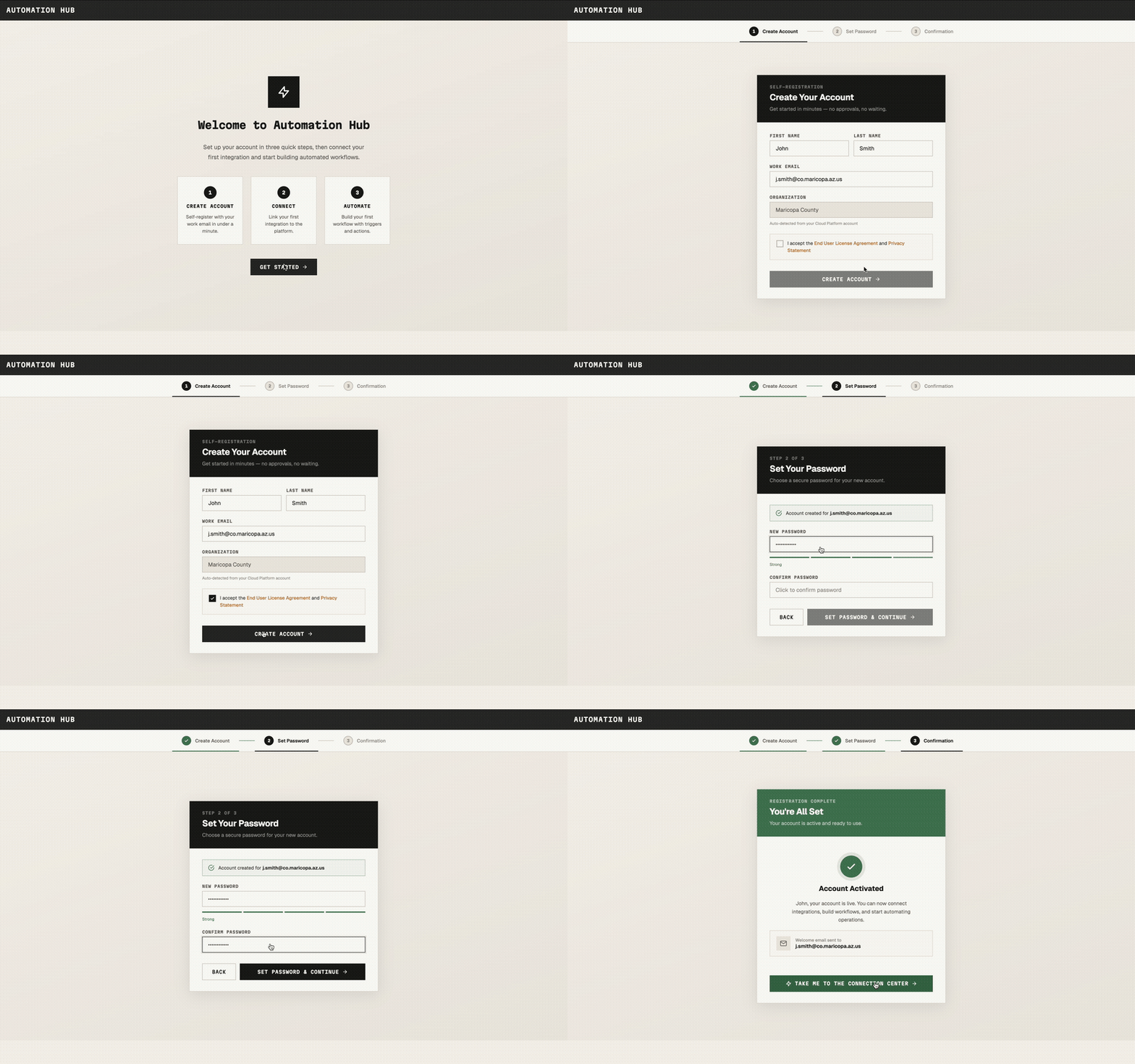
The Google Form disappeared entirely. Users create an account, set a password, and reach a live dashboard in one sitting — no approvals, no handoffs. The flow auto-detects the organization from the user's cloud platform account, eliminating manual entry and preventing misconfiguration. The three-step structure gives users a clear sense of progress and a definitive "you're done" moment.

Connection Center
Connection Center

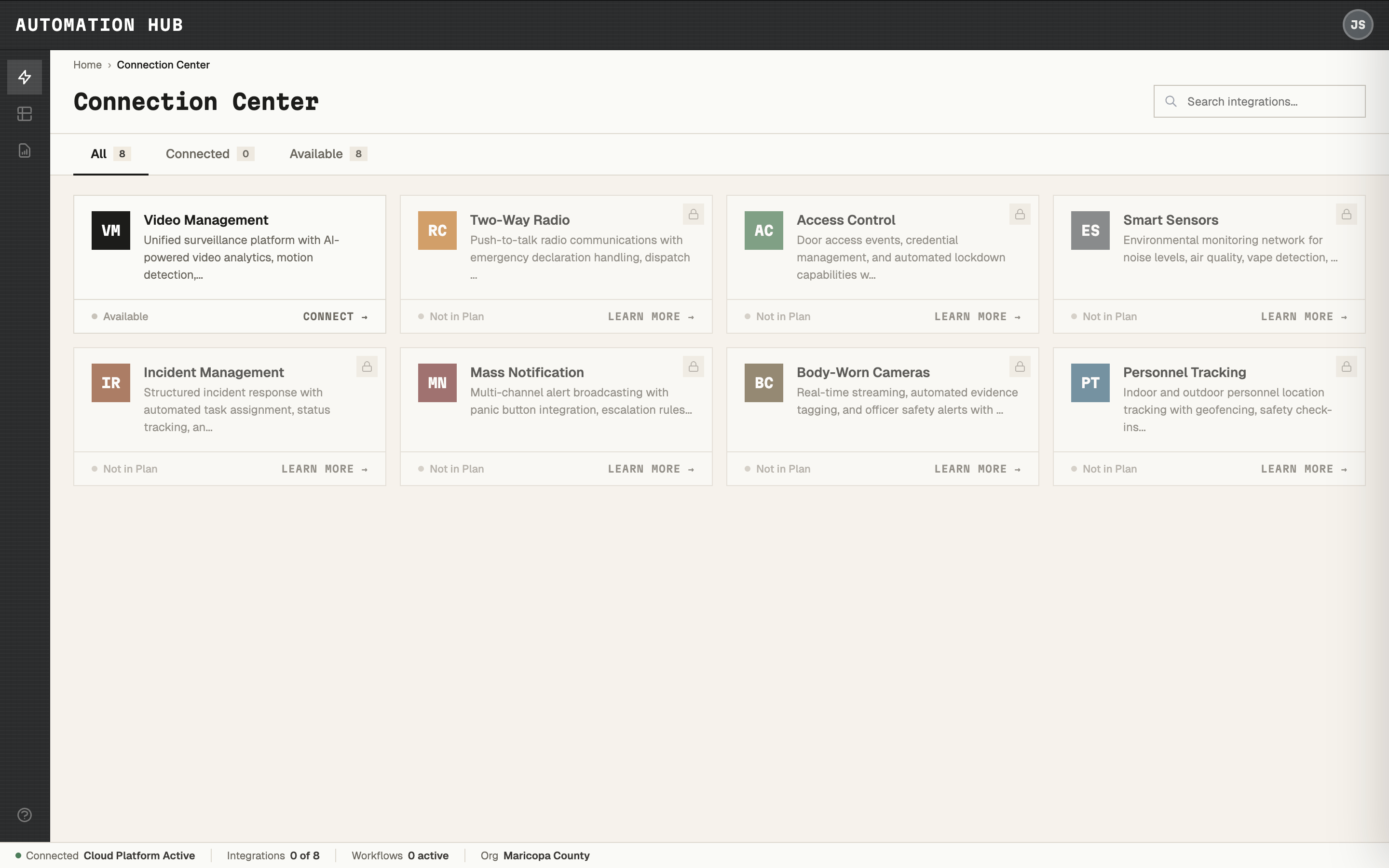
A single interface where administrators discover every integration available to their organization, with clear status indicators and a consistent card structure across products.

Setup Page

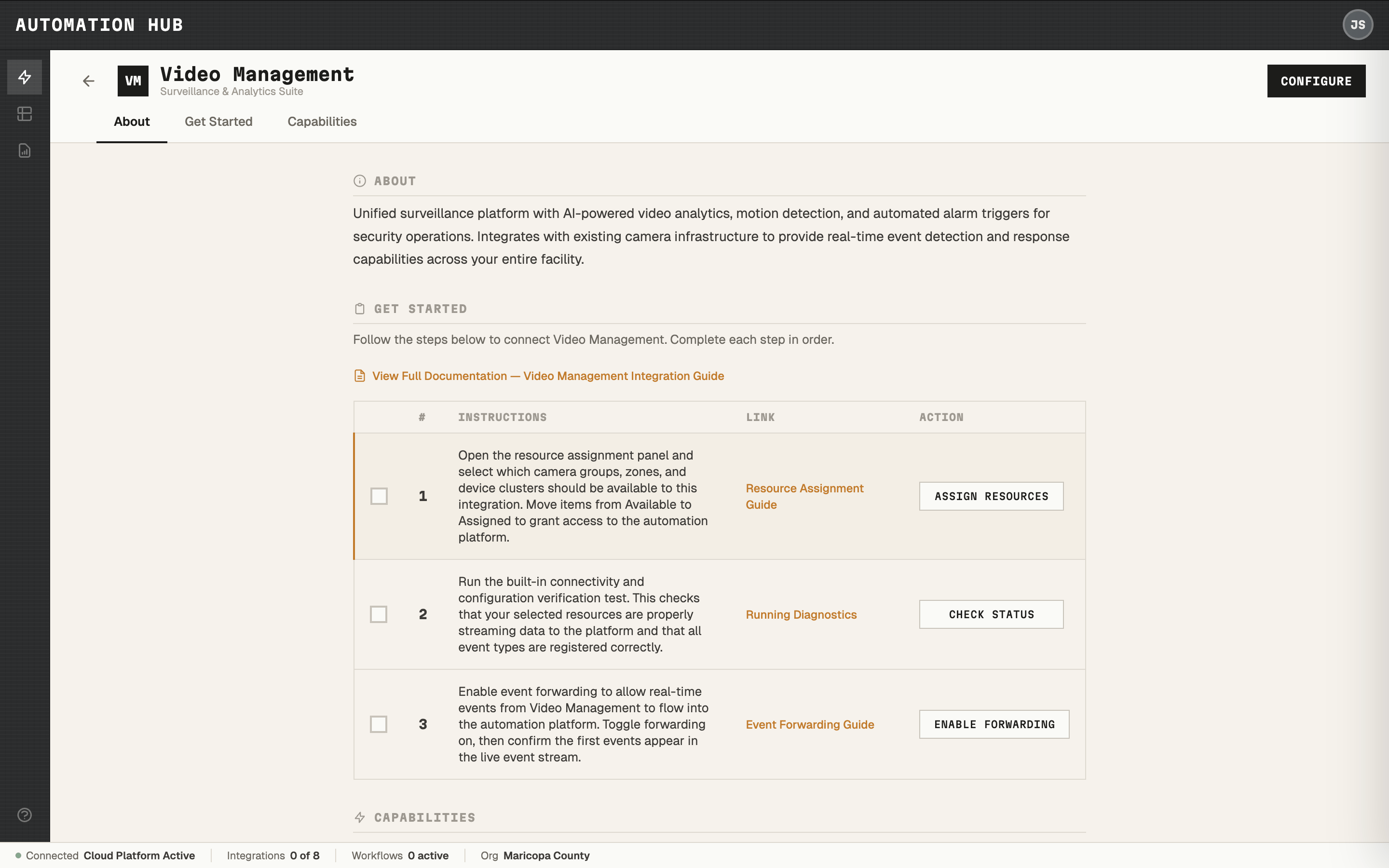
Drilling into any product reveals a guided setup checklist — numbered steps, plain-language instructions, documentation links, and action buttons to complete each step without leaving the page. The consistent rhythm across products replaced a scattered landscape of product-specific documentation and tribal knowledge.

UX Copy and Content Strategy

I led a content overhaul replacing dense technical documentation with action-oriented checklists. The governing principle: same concept, same word, every time. Inconsistent terminology was a direct cause of support tickets — administrators couldn't tell whether two different terms referred to the same thing or different things. Standardizing the language meant non-specialists could complete setup without needing to decode it first.
Dual List Selector

Reusable Components

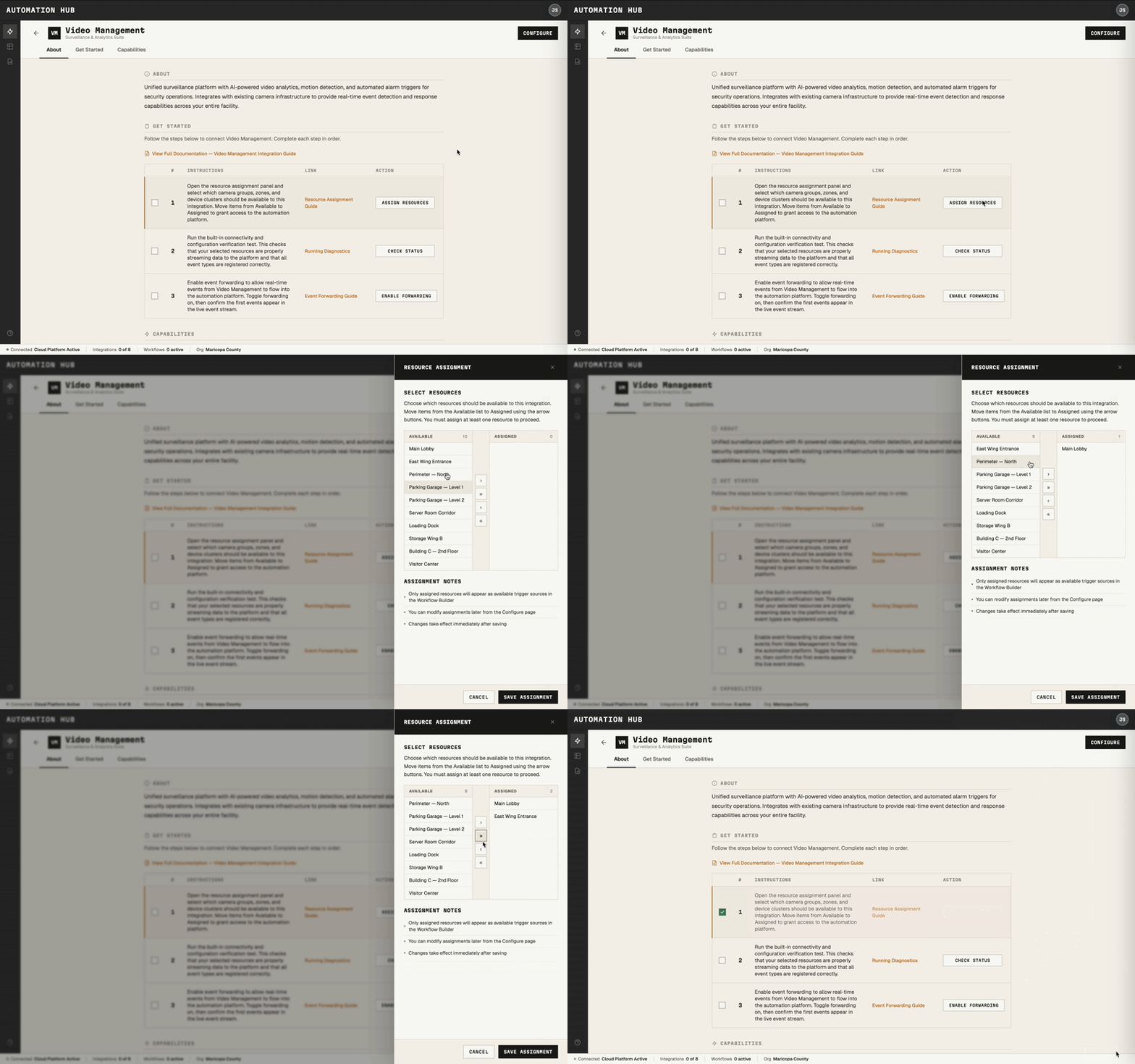
The Connection Center's resource assignment pattern required a component that didn't exist in the design system. I designed and prototyped a dual listbox handling search, bulk selection, and transfer feedback. It was adopted into the platform-wide design system and is now used across product teams.

Simulate and Validate Workflows

Onboarding was the entry point, but I also shipped features across the platform's operational core as part of an autonomous team working in kanban.

Beyond Onboarding

This included workflow simulation (letting administrators test automation logic before going live with real events), workflow suppression (preventing duplicate alerts in noisy environments), global enable/disable (pausing and resuming all workflows simultaneously while remembering previous state), and incident notification controls (configurable alert muting for managed situations). These share a common principle: automation that can't be easily tested, paused, or scoped is automation that doesn't get trusted.

Outcomes

Setup time: days → minutes. The Google Form, the multi-day wait, and the email threads were eliminated entirely.


Support dependency dropped. Consistent guidance and inline verification replaced the need for specialist hand-holding. Administrators completed setup independently.


Cross-team delivery accelerated. Standardized content guidelines and reusable components meant product teams shipped faster and maintained consistency without re-solving problems.


Operational confidence increased. Simulation, suppression, and global controls gave administrators the tools to test, tune, and trust their automation.

Reflections

Design the runway, not just the plane.

Self-serve onboarding is the multiplier that makes everything downstream valuable.


Standardize the verbs.

One shared setup rhythm beats ten bespoke flows.

Clarity compounds. Every term you standardize is a support ticket that never gets filed.


Ship the baseline, then deepen.

Advanced scenarios layer on — but only if the foundation is trustworthy enough that teams actually use it.


Operational controls are design work.

Simulation and suppression aren't admin features bolted on at the end. They're why administrators trust the system enough to let it run.

This case study reflects real design work. Certain labels, visuals, and data are anonymized or reconstructed from public references. No confidential or proprietary information is disclosed.

© 2026 JOE BALICH

AVAILABLE FOR WORK

V.1.0

Self-Serve Setup Across a Fragmented Ecosystem

At a Glance

Role: Senior UX Designer — project lead for onboarding and integrations


Users: System administrators and IT managers deploying public safety tools across multi-vendor ecosystems


Problem: Account setup required multiple approvals, handoffs, and days of waiting — with inconsistent steps and terminology across every product


Solution: Self-serve registration, a centralized Connection Center, standardized UX copy, and operational controls that gave administrators confidence from first login through live deployment


Tools: Figma, FigJam, company design system, Google Workspace


Outcome: Onboarding collapsed from days to minutes. Administrators who previously needed multiple support calls completed setup independently. A dual listbox component was adopted into the platform-wide design system.

The Problem

Public safety tech stacks are sprawling — radios, cameras, sensors, and access control systems acquired from different vendors, expected to work as one platform. Getting there required a setup process that was everything it shouldn't be.


The before state was a Google Form. Request-and-wait, with a 3–5 business day activation window and multiple communication threads before an account was live. Every product had its own instructions, its own terminology, its own rhythm. Non-technical administrators were expected to reconcile conflicts across them on their own — and every day they spent waiting was a day the technology investment sat idle.

Key Decisions

Discovery included journey mapping, service blueprinting, VOC interviews, and QA teardowns with engineering. The value wasn't the artifacts — it was the strategic decisions they produced.


Define a minimum viable setup baseline per product. Rather than solving every edge case across every product simultaneously, I pushed for the smallest set of steps that consistently got a team operational. This gave us a shippable target without waiting on completeness, and a foundation that advanced scenarios could layer onto later.


Standardize the sequence, not the features. Each product had different capabilities, but the rhythm of setup could be the same. I established a universal pattern — check prerequisites → connect → verify → monitor — so administrators who learned the pattern once could apply it everywhere.


Self-serve first, guided second, human-assisted last. Service blueprinting revealed that most human touchpoints existed not because tasks were complex, but because the system didn't provide enough feedback for administrators to proceed with confidence. The fix was building verification into the flow, not adding more documentation.

The Solutions

Self-Registration

Self-Registration

The Google Form disappeared entirely. Users create an account, set a password, and reach a live dashboard in one sitting — no approvals, no handoffs. The flow auto-detects the organization from the user's cloud platform account, eliminating manual entry and preventing misconfiguration. The three-step structure gives users a clear sense of progress and a definitive "you're done" moment.

Connection Center

Connection Center

A single interface where administrators discover every integration available to their organization, with clear status indicators and a consistent card structure across products.

Setup Page

Drilling into any product reveals a guided setup checklist — numbered steps, plain-language instructions, documentation links, and action buttons to complete each step without leaving the page. The consistent rhythm across products replaced a scattered landscape of product-specific documentation and tribal knowledge.

UX Copy and Content Strategy

I led a content overhaul replacing dense technical documentation with action-oriented checklists. The governing principle: same concept, same word, every time. Inconsistent terminology was a direct cause of support tickets — administrators couldn't tell whether two different terms referred to the same thing or different things. Standardizing the language meant non-specialists could complete setup without needing to decode it first.

Dual List Selector

Reusable Components

The Connection Center's resource assignment pattern required a component that didn't exist in the design system. I designed and prototyped a dual listbox handling search, bulk selection, and transfer feedback. It was adopted into the platform-wide design system and is now used across product teams.

Simulate and Validate Workflows

Onboarding was the entry point, but I also shipped features across the platform's operational core as part of an autonomous team working in kanban.

Beyond Onboarding

This included workflow simulation (letting administrators test automation logic before going live with real events), workflow suppression (preventing duplicate alerts in noisy environments), global enable/disable (pausing and resuming all workflows simultaneously while remembering previous state), and incident notification controls (configurable alert muting for managed situations). These share a common principle: automation that can't be easily tested, paused, or scoped is automation that doesn't get trusted.

Outcomes

Setup time: days → minutes. The Google Form, the multi-day wait, and the email threads were eliminated entirely.


Support dependency dropped. Consistent guidance and inline verification replaced the need for specialist hand-holding. Administrators completed setup independently.


Cross-team delivery accelerated. Standardized content guidelines and reusable components meant product teams shipped faster and maintained consistency without re-solving problems.


Operational confidence increased. Simulation, suppression, and global controls gave administrators the tools to test, tune, and trust their automation.

Reflections

Design the runway, not just the plane.

Self-serve onboarding is the multiplier that makes everything downstream valuable.


Standardize the verbs.

One shared setup rhythm beats ten bespoke flows.

Clarity compounds. Every term you standardize is a support ticket that never gets filed.


Ship the baseline, then deepen.

Advanced scenarios layer on — but only if the foundation is trustworthy enough that teams actually use it.


Operational controls are design work.

Simulation and suppression aren't admin features bolted on at the end. They're why administrators trust the system enough to let it run.

This case study reflects real design work. Certain labels, visuals, and data are anonymized or reconstructed from public references. No confidential or proprietary information is disclosed.

© 2026 JOE BALICH

AVAILABLE FOR WORK

V.1.0

Self-Serve Setup Across a Fragmented Ecosystem

At a Glance

Role: Senior UX Designer — project lead for onboarding and integrations


Users: System administrators and IT managers deploying public safety tools across multi-vendor ecosystems


Problem: Account setup required multiple approvals, handoffs, and days of waiting — with inconsistent steps and terminology across every product


Solution: Self-serve registration, a centralized Connection Center, standardized UX copy, and operational controls that gave administrators confidence from first login through live deployment


Tools: Figma, FigJam, company design system, Google Workspace


Outcome: Onboarding collapsed from days to minutes. Administrators who previously needed multiple support calls completed setup independently. A dual listbox component was adopted into the platform-wide design system.

The Problem

Public safety tech stacks are sprawling — radios, cameras, sensors, and access control systems acquired from different vendors, expected to work as one platform. Getting there required a setup process that was everything it shouldn't be.


The before state was a Google Form. Request-and-wait, with a 3–5 business day activation window and multiple communication threads before an account was live. Every product had its own instructions, its own terminology, its own rhythm. Non-technical administrators were expected to reconcile conflicts across them on their own — and every day they spent waiting was a day the technology investment sat idle.

Key Decisions

Discovery included journey mapping, service blueprinting, VOC interviews, and QA teardowns with engineering. The value wasn't the artifacts — it was the strategic decisions they produced.


Define a minimum viable setup baseline per product. Rather than solving every edge case across every product simultaneously, I pushed for the smallest set of steps that consistently got a team operational. This gave us a shippable target without waiting on completeness, and a foundation that advanced scenarios could layer onto later.


Standardize the sequence, not the features. Each product had different capabilities, but the rhythm of setup could be the same. I established a universal pattern — check prerequisites → connect → verify → monitor — so administrators who learned the pattern once could apply it everywhere.


Self-serve first, guided second, human-assisted last. Service blueprinting revealed that most human touchpoints existed not because tasks were complex, but because the system didn't provide enough feedback for administrators to proceed with confidence. The fix was building verification into the flow, not adding more documentation.

The Solutions

Self-Registration

Self-Registration

The Google Form disappeared entirely. Users create an account, set a password, and reach a live dashboard in one sitting — no approvals, no handoffs. The flow auto-detects the organization from the user's cloud platform account, eliminating manual entry and preventing misconfiguration. The three-step structure gives users a clear sense of progress and a definitive "you're done" moment.

Connection Center

Connection Center

A single interface where administrators discover every integration available to their organization, with clear status indicators and a consistent card structure across products.

Setup Page

Drilling into any product reveals a guided setup checklist — numbered steps, plain-language instructions, documentation links, and action buttons to complete each step without leaving the page. The consistent rhythm across products replaced a scattered landscape of product-specific documentation and tribal knowledge.

UX Copy and Content Strategy

I led a content overhaul replacing dense technical documentation with action-oriented checklists. The governing principle: same concept, same word, every time. Inconsistent terminology was a direct cause of support tickets — administrators couldn't tell whether two different terms referred to the same thing or different things. Standardizing the language meant non-specialists could complete setup without needing to decode it first.

Reusable Components

Dual List Selector

The Connection Center's resource assignment pattern required a component that didn't exist in the design system. I designed and prototyped a dual listbox handling search, bulk selection, and transfer feedback. It was adopted into the platform-wide design system and is now used across product teams.

Beyond Onboarding

Onboarding was the entry point, but I also shipped features across the platform's operational core as part of an autonomous team working in kanban.

Simulate and Validate Workflows

This included workflow simulation (letting administrators test automation logic before going live with real events), workflow suppression (preventing duplicate alerts in noisy environments), global enable/disable (pausing and resuming all workflows simultaneously while remembering previous state), and incident notification controls (configurable alert muting for managed situations). These share a common principle: automation that can't be easily tested, paused, or scoped is automation that doesn't get trusted.

Outcomes

Setup time: days → minutes. The Google Form, the multi-day wait, and the email threads were eliminated entirely.


Support dependency dropped. Consistent guidance and inline verification replaced the need for specialist hand-holding. Administrators completed setup independently.


Cross-team delivery accelerated. Standardized content guidelines and reusable components meant product teams shipped faster and maintained consistency without re-solving problems.


Operational confidence increased. Simulation, suppression, and global controls gave administrators the tools to test, tune, and trust their automation.

Reflections

Design the runway, not just the plane.

Self-serve onboarding is the multiplier that makes everything downstream valuable.


Standardize the verbs.

One shared setup rhythm beats ten bespoke flows.

Clarity compounds. Every term you standardize is a support ticket that never gets filed.


Ship the baseline, then deepen.

Advanced scenarios layer on — but only if the foundation is trustworthy enough that teams actually use it.


Operational controls are design work.

Simulation and suppression aren't admin features bolted on at the end. They're why administrators trust the system enough to let it run.

This case study reflects real design work. Certain labels, visuals, and data are anonymized or reconstructed from public references. No confidential or proprietary information is disclosed.

© 2026 JOE BALICH

AVAILABLE FOR WORK

V.1.0